
Upgrading to SAS 9.4 M8 Does Not Mean PostgreSQL is Upgraded too
Once a Upgrade to SAS 9.4 TS1 M8 is completed, the SAS Web Infrastructure Platform DB 9.5 or 12.3 version is still running. Following are the steps to ensure that the PostgreSQL is upgraded to version 14
Reference link: https://go.documentation.sas.com/doc/en/pgmsascdc/9.4_3.5/whatsdiff/p1bqjvln7zpemnn1mvstcx8q7u6b.htm
To upgrade to PostgreSQL 14: (Using One Machine Example)
- Perform a backup of the deployment. You might have performed this backup before upgrading in place.
- Stop all SAS services; on all nodes if multi machine deployment.
- Determine all the machines that contain at least one PostgreSQL data server instance. Each machine contains this directory:
/<SASHome/>/SASWebInfrastructurePlatformDataServer/9.4.
You need to perform these steps on all machines with PostgreSQL.
- Run the SAS Deployment Wizard from your software depot
- Select Install SAS software and click Next.
- Select an existing SAS Home and click Next.
- Select Install Additional Software and click Next.
- Select the SAS Web Infrastructure Platform Data Server check box and click Next.
- Click Next through the next several steps and then click Start.
- When the installation has completed successfully, click Next and Finish.
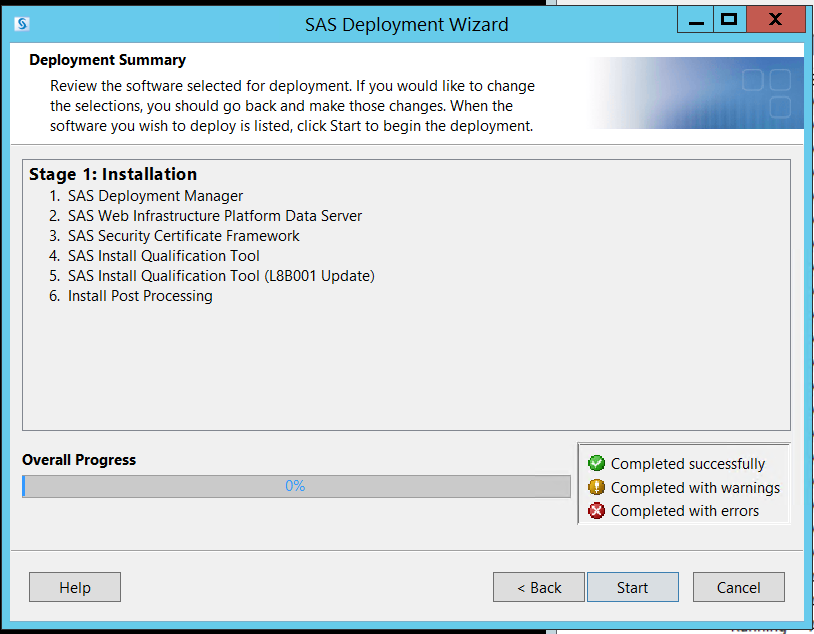
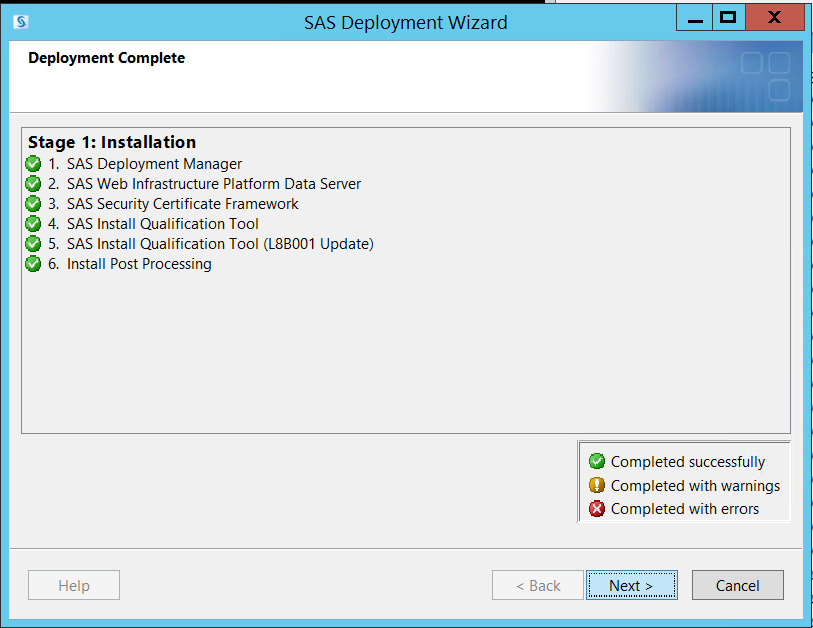
- In the /<SASHome/>/SASWebInfrastructurePlatformDataServer directory, complete these steps:
- Locate the 9.4_PREVIOUS-yyyy-mm-dd-HH.MM.SS folder that contains the version of the PostgreSQL database that you are upgrading from that you identified in step 3e.
Note: If you have only one 9.4_PREVIOUS directory, you can skip the rest of step 11. You already have the correct binaries in place.
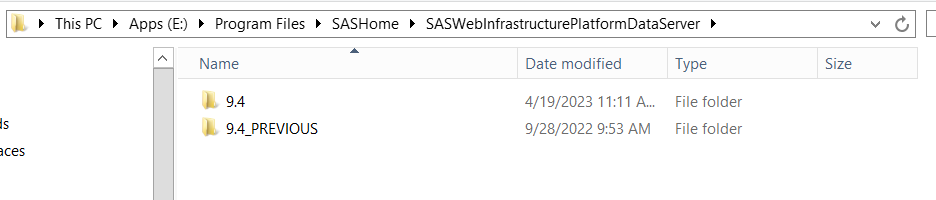
To determine the version of binaries in each of the 9.4_PREVIOUS/* directories:
At a command prompt, run the postgres --version command from the bin directory.
UNIX: /<SASHome/>/SASWebInfrastructurePlatformDataServer/9.4_PREVIOUS-yyyy-mm-dd-HH.MM.SS/bin/postgres --version Windows: /<SASHome/>/SASWebInfrastructurePlatformDataServer/9.4_PREVIOUS-yyyy-mm-dd-HH.MM.SS/bin/postgres.exe --version - If the current 9.4_PREVIOUS directory does not contain the correct binaries, rename or delete this directory.
- Rename the folder that contains the binaries that match the version of PostgreSQL database that you are upgrading from to 9.4_PREVIOUS.
- Locate the 9.4_PREVIOUS-yyyy-mm-dd-HH.MM.SS folder that contains the version of the PostgreSQL database that you are upgrading from that you identified in step 3e.
- Repeat steps 3–11 for each tier that has SASHome/SASWebInfrastructurePlatformDataServer installed.
- Start the SAS Metadata Server.
- In a command prompt or terminal session, change the directory to
/<SASHome/>/SASWebInfrastructurePlatformDataServer/9.4/scripts/upgrade.
Display an analysis report before Upgrading:
- This report lists each PostgreSQL data server configuration found in metadata,
- Located locally to the machine or remotely on another machine
- Eligible to upgrade or have been upgraded to PostgreSQL 14.
- In Linux environments, run run.sh.
- In Windows environments, run run.bat.
Use these parameters to connect to a metadata server using the SAS Administrator (sasadmin) credentials:
--metaserver /<metadata-host/> --metaport /<metadata-port/> --metauser /<sasadm-userid/> --metapass /<sasadm-password/>Example:
./run.sh --metaserver 127.0.0.1 --metaport 8561 --metauser sasadm@saspw --metapass XXXXXOutput result:
E:/Program Files/SASHome/SASWebInfrastructurePlatformDataServer/9.4/scripts/upgrade/>run.bat --metaserver abc.domain.local --metaport 8561 --metauser sasadm@saspw --metapass abcsas Multiple Instance Mode(metadata required): requiring Additional Metadata parameters --------------- LOGLEVEL set to : INFO --------------- 2023.04.19_11:16:37 INFO: Starting execution. 2023.04.19_11:16:37 INFO: Processing registry for installed products. 2023.04.19_11:16:41 INFO: Processing: WEBINFDSVRC 2023.04.19_11:16:42 INFO: Binaries version of E:/Program Files/SASHome/SASWebInfrastructurePlatformDataServer/9.4_PREVIOUS is 12 2023.04.19_11:16:42 INFO: Binaries version of E:/Program Files/SASHome/SASWebInfrastructurePlatformDataServer/9.4 is 14 2023.04.19_11:16:42 INFO: The following data directory is available: E:/SAS/Config/Lev1/WebInfrastructurePlatformDataServer/data 2023.04.19_11:16:46 INFO: 9.4 SYSTEM POSTGRES ANALYSIS: ============================================= Web Infrastructure Platform Data Server 9.4(WEBINFDSVRC) ============================================= DataServer Home Binary Location: E:/Program Files/SASHome/SASWebInfrastructurePlatformDataServer/9.4 DataServer Data Location: E:/SAS/Config/Lev1/WebInfrastructurePlatformDataServer/data DataServer Configuration Location: E:/SAS/Config/Lev1/WebInfrastructurePlatformDataServer DataServer User: dbmsowner DataServer Machine: abc.domain.local (local) DataServer Port: 9432 DataServer Current Version: 12 DataServer Target Version: 14 ============================================= Total Number of Data Servers: 1 Total Number of Local Data Servers: 1 Total Number of Remote Data Servers: 0 Total Number of Data Servers Ready to Upgrade: 1 To upgrade the data servers on this host, run the same command with "--upgrade" parameter. 2023.04.19_11:16:46 INFO: Ending execution E:/Program Files/SASHome/SASWebInfrastructurePlatformDataServer/9.4/scripts/upgrade/> - Upgrade any of the local PostgreSQL data servers by adding –upgrade parameter to the script that produced the analysis report.
Example:
./run.sh --metaserver 127.0.0.1 --metaport 8561 --metauser sasadm@saspw --metapass XXXXXX --upgradeOutput result:
E:/Program Files/SASHome/SASWebInfrastructurePlatformDataServer/9.4/scripts/upgrade/>run.bat --metaserver abc.domain.local --metaport 8561 --metauser sasadm@saspw --metapass abcsas --upgrade Multiple Instance Mode(metadata required): requiring Additional Metadata parameters --------------- LOGLEVEL set to : INFO --------------- 2023.04.19_11:21:37 INFO: Starting execution. 2023.04.19_11:21:37 INFO: Processing registry for installed products. 2023.04.19_11:21:41 INFO: Processing: WEBINFDSVRC 2023.04.19_11:21:41 INFO: Binaries version of E:/Program Files/SASHome/SASWebInfrastructurePlatformDataServer/9.4_PREVIOUS is 12 2023.04.19_11:21:41 INFO: Binaries version of E:/Program Files/SASHome/SASWebInfrastructurePlatformDataServer/9.4 is 14 2023.04.19_11:21:41 INFO: The following data directory is available: E:/SAS/Config/Lev1/WebInfrastructurePlatformDataServer/data 2023.04.19_11:21:41 INFO: Starting Postgres Update for: WEBINFDSVRC 2023.04.19_11:21:41 INFO: Stopping the service... 2023.04.19_11:21:41 INFO: The version for the backup creation is: 12 2023.04.19_11:21:41 INFO: Renaming data directory: E:/SAS/Config/Lev1/WebInfrastructurePlatformDataServer/data to : E:/SAS/Config/Lev1/WebInfrastructurePlatformDataServer/data_backup_12 2023.04.19_11:21:41 INFO: Successfully backed up the directory/file. 2023.04.19_11:21:41 INFO: Successfully created the directory. 2023.04.19_11:21:41 INFO: Updating E:/SAS/Config/Lev1/WebInfrastructurePlatformDataServer/webinfdsvrc_temp.bat 2023.04.19_11:21:41 INFO: Starting the service... 2023.04.19_11:21:56 INFO: Successfully created database dump: E:/SAS/Config/Lev1/WebInfrastructurePlatformDataServer/temp/db_update.dat 2023.04.19_11:21:56 INFO: Updating the dumpfile to not initiate the super user 2023.04.19_11:22:05 INFO: Stopping the service... 2023.04.19_11:22:07 INFO: Successfully able to initialize database. 2023.04.19_11:22:07 INFO: Changing the directory/file name to back up the following directory: E:/SAS/Config/Lev1/WebInfrastructurePlatformDataServer/data/postgresql.conf 2023.04.19_11:22:07 INFO: Attempting to update the postgres.conf file. 2023.04.19_11:22:07 INFO: Starting the service... 2023.04.19_11:22:13 INFO: Attempting to restore Data Server contents for 2023.04.19_11:22:53 INFO: Stopping the service... 2023.04.19_11:22:54 INFO: Changing the directory/file name to back up the following directory: E:/SAS/Config/Lev1/WebInfrastructurePlatformDataServer/data/pg_hba.conf 2023.04.19_11:22:54 INFO: The --KEEPDUMP option has NOT been set. The following dumpfile will be deleted: E:/SAS/Config/Lev1/WebInfrastructurePlatformDataServer/temp/db_update.dat 2023.04.19_11:22:55 INFO: Postgres Update for WEBINFDSVRC is complete. 2023.04.19_11:22:55 INFO: Data Server was successfully updated: WEBINFDSVRC 2023.04.19_11:22:55 INFO: Creating UIP_VERSION file in the following location to indicate upgrade completion: E:/SAS/Config/Lev1/WebInfrastructurePlatformDataServer/data/UIP_VERSION 2023.04.19_11:22:55 INFO: Successfully created UIP_VERSION file. 2023.04.19_11:22:58 INFO: 9.4 SYSTEM POSTGRES UPGRADE SUMMARY: ============================================= Web Infrastructure Platform Data Server 9.4(WEBINFDSVRC) upgrade SUCCESSFUL ============================================= Successful Upgrades: 1 Unsuccessful Upgrades: 0 2023.04.19_11:22:58 INFO: Ending execution E:/Program Files/SASHome/SASWebInfrastructurePlatformDataServer/9.4/scripts/upgrade/> - Re-verification, need to run this command again
--metaserver /<metadata-host/> --metaport /<metadata-port/> --metauser /<sasadm-userid/> --metapass /<sasadm-password/>Output results:
E:/Program Files/SASHome/SASWebInfrastructurePlatformDataServer/9.4/scripts/upgrade/>run.bat --metaserver abc.domain.local --metaport 8561 --metauser sasadm@saspw --metapass abcsas Multiple Instance Mode(metadata required): requiring Additional Metadata parameters --------------- LOGLEVEL set to : INFO --------------- 2023.04.19_11:24:54 INFO: Starting execution. 2023.04.19_11:24:54 INFO: Processing registry for installed products. 2023.04.19_11:24:57 INFO: Processing: WEBINFDSVRC 2023.04.19_11:24:58 INFO: Binaries version of E:/Program Files/SASHome/SASWebInfrastructurePlatformDataServer/9.4_PREVIOUS is 12 2023.04.19_11:24:58 INFO: Binaries version of E:/Program Files/SASHome/SASWebInfrastructurePlatformDataServer/9.4 is 14 2023.04.19_11:24:58 INFO: The following data directory is available: E:/SAS/Config/Lev1/WebInfrastructurePlatformDataServer/data 2023.04.19_11:24:58 INFO: WEBINFDSVRC seems already upgraded to the target version. 2023.04.19_11:24:58 INFO: Data Server already at specified version: 14 | Web Infrastructure Platform Data Server 9.4(WEBINFDSVRC) 2023.04.19_11:25:01 INFO: 9.4 SYSTEM POSTGRES ANALYSIS: ============================================= Web Infrastructure Platform Data Server 9.4(WEBINFDSVRC) ============================================= DataServer Home Binary Location: E:/Program Files/SASHome/SASWebInfrastructurePlatformDataServer/9.4 DataServer Data Location: E:/SAS/Config/Lev1/WebInfrastructurePlatformDataServer/data DataServer Configuration Location: E:/SAS/Config/Lev1/WebInfrastructurePlatformDataServer DataServer User: dbmsowner DataServer Machine: abc.domain.local(local) DataServer Port: 9432 DataServer Current Version: 14 ============================================= Total Number of Data Servers: 1 Total Number of Local Data Servers: 1 Total Number of Remote Data Servers: 0 Total Number of Data Servers Ready to Upgrade: 0 All local discovered dataservers are at the correct version. 2023.04.19_11:25:01 INFO: Ending execution E:/Program Files/SASHome/SASWebInfrastructurePlatformDataServer/9.4/scripts/upgrade/> - Need to restart/reboot all SAS services
This article used one machine example, in case of multi-machine deployment repeat steps 14, 15 and 16 for each Config level and then for each machine that includes a PostgreSQL DB server. Once all these steps are completed start all SAS services on all machines in order.