
SAS Admin
SAS Web Infrastructure Platform error during SAS Configuration
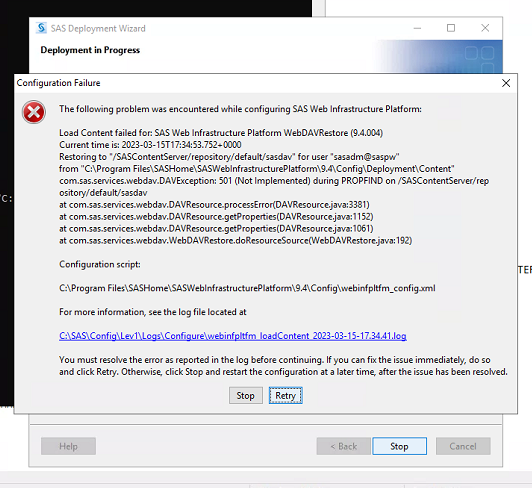
The following problem was encountered while configuring SAS Web Infrastructure Platform:
Load Content failed for: SAS Web Infrastructure Platform WebDAVRestore (9.4.004)
Error message in /<SAS Configuration/>/SAS/Config/Lev1/Web/WebAppServer/SASServer1_1/server.log file
Caused by: com.atomikos.datasource.pool.CreateConnectionException: Could not create JDBC connection

at com.atomikos.jdbc.nonxa.AtomikosNonXAConnectionFactory.createPooledConnection(AtomikosNonXAConnectionFactory.java:130) ~[transactions-jdbc.jar:?]

at com.atomikos.datasource.pool.ConnectionPool.growPool(ConnectionPool.java:250) ~[transactions-jta.jar:?]

Caused by: org.postgresql.util.PSQLException: FATAL: password authentication failed for user "SharedServices"

at org.postgresql.core.v3.ConnectionFactoryImpl.doAuthentication(ConnectionFactoryImpl.java:613) ~[postgresql.jar:42.2.25]

2023-03-15 17:29:08,303 ERROR (Catalina-utility-6) [org.apache.catalina.core.ContainerBase.[Catalina].[localhost].[/SASLogon/]] Exception sending context initialized event to listener instance of class [com.sas.svcs.security.authentication.listeners.QuartzListener]
Resolution:
Possible cause asterisk sign or symbol in SAS internal id password

Steps to do: Re-configure of SAS using recommended password below
Recommendation: Please do not use * or @ or ! or ^ ( or ) in passwords for SAS Internal User Accounts and SAS external User Accounts Only (not end users). You could use Alpha numeric and mix of upper and lower case for passwords works the best.